
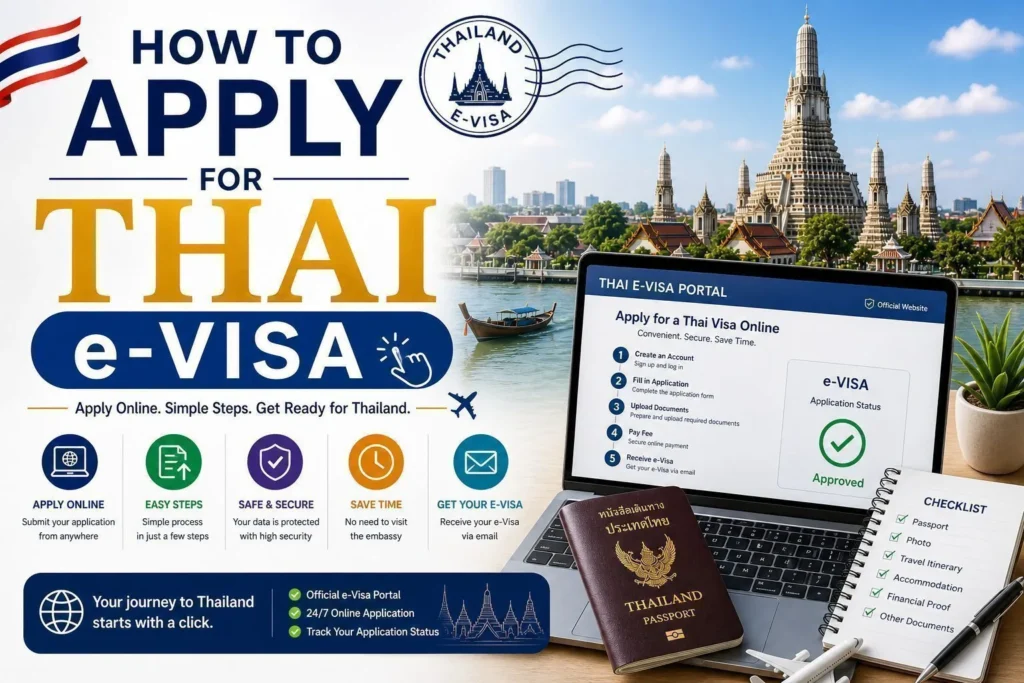
How to Apply for Thai e-Visa: Step-by-Step Guide for Foreign Travelers
You are ready to visit Thailand, but the visa process feels confusing. One page says you can enter visa-free, another says you need a Tourist Visa, and then you find the Thai e-Visa website asking you to create an account, upload documents, and pay online. The biggest worry for many travelers is simple: “Am I applying in the right place, and am I choosing the right visa?”
To apply for a Thai e-Visa, use the official Thai e-Visa website, create an account, complete the application form, upload the required documents, pay the visa fee, wait for processing, and receive the e-Visa confirmation by email. The Thai e-Visa website is the official electronic visa application system of Thailand’s Ministry of Foreign Affairs.
From our visa handling experience, the online system itself is usually not the hardest part. The real challenge is choosing the correct visa type and preparing documents that clearly support your purpose of travel.
What Is Thai e-Visa?
Thailand’s official online visa application system
Thai e-Visa is Thailand’s online visa application system. Instead of visiting an embassy in person in many cases, applicants can submit their visa application online, upload documents, pay the fee, and receive the approved e-Visa confirmation by email.
The official Thai e-Visa guide describes the online process as: create an account, fill in an application form, upload supporting documents, pay the visa fee, wait for the visa to be processed, and receive the e-Visa confirmation document by email.
| Thai e-Visa Step | What It Means | Common Mistake |
|---|---|---|
| Create account | Register on the official Thai e-Visa platform | Using an email address you cannot access later |
| Complete form | Enter personal, passport, travel, and visa details | Choosing the wrong visa type or entering passport details incorrectly |
| Upload documents | Submit supporting evidence based on your visa type | Blurry files, cropped documents, or weak financial evidence |
| Pay and wait | Pay the visa fee and wait for processing | Applying too close to the travel date |
Official sources to use
Apply only through the official Thai e-Visa website. You can also check the latest requirements from the Royal Thai Embassy or Consulate responsible for your location before submitting your documents.
Do You Need to Apply for Thai e-Visa?
Not everyone needs an e-Visa
Some travelers may be able to enter Thailand under visa exemption depending on nationality and purpose of travel. Others may need a Tourist Visa, Non-Immigrant Visa, DTV Visa, or another category.
From real client cases, two opposite mistakes happen often: some travelers apply for a visa before checking whether they need one, while others assume they can enter visa-free when their nationality, stay length, or purpose actually requires a visa.
| Situation | Route to Check | Practical Advice |
|---|---|---|
| Short holiday by eligible nationality | Visa exemption | Check whether you truly need a visa before paying a fee |
| Tourism but not visa-exempt | Tourist Visa through Thai e-Visa if available | Prepare travel plan, accommodation, funds, and return or onward travel |
| Remote work or long-stay lifestyle | DTV Visa or another suitable category | Show foreign work, income, financial evidence, and purpose clearly |
| Work, study, retirement, family, or medical stay | Purpose-specific visa | Documents must match the real purpose, not just the easiest checklist |
Thai e-Visa Application Location and Embassy Jurisdiction
Your current location matters
Thai e-Visa availability and requirements may depend on your current location, nationality, and the Royal Thai Embassy or Consulate responsible for your application. Some applicants can complete the process fully online, while others may need to follow embassy-specific instructions.
| What to Check | Why It Matters | Practical Tip |
|---|---|---|
| Current location | Embassy jurisdiction may depend on where you currently reside | Prepare proof of residence if the embassy requires it |
| Visa category | Some categories may need additional documents | Read the embassy-specific checklist before payment |
| Local rules | Fees, document formats, and processing practices may vary | Do not rely only on another applicant’s experience from a different country |
How to Apply for Thai e-Visa Step by Step
Step 1: Check whether you need a visa
Before creating an application, confirm whether your nationality, purpose, and length of stay require a Thai visa. If you are visa-exempt, you may not need to apply.
Step 2: Create an account
Go to the official Thai e-Visa website and create an account using an email address you can access easily. Approval, requests for additional documents, and system notifications may be sent there.
Step 3: Start a new application
Sign in and select the correct nationality, current location, travel document type, visa type, purpose of visit, and embassy jurisdiction.
Step 4: Fill in the application form
Enter your personal details exactly as shown in your passport. Check name spelling, passport number, date of birth, travel dates, address in Thailand, and contact details carefully.
Step 5: Upload supporting documents
Upload documents based on your visa type. Avoid blurry photos, cropped pages, screenshots without names, or files that do not show dates and key details.
Step 6: Review before payment
Before paying, review the visa type, passport details, travel dates, uploaded files, email address, purpose of visit, and financial evidence. Once submitted and paid, changing information may be difficult.
Step 7: Pay the visa fee
Fees may differ depending on visa type, embassy location, and local currency. Check the latest fee and refund policy from the official system or embassy before payment.
Step 8: Wait for processing
Processing time can vary depending on visa type, embassy workload, holidays, missing documents, and whether additional review is needed. Apply early enough to handle follow-up requests calmly.
Step 9: Respond quickly if more documents are requested
If the embassy asks for additional documents, read the request carefully and upload exactly what is needed. A request for more documents does not always mean refusal.
Step 10: Receive and save your e-Visa
Once approved, the e-Visa confirmation is sent by email. Save it as a PDF, keep an offline copy on your phone, and print one copy if possible.
Thai e-Visa Documents Checklist
Your documents must support your visa purpose
The strongest Thai e-Visa applications are not always the thickest. They are the clearest. A tourist file, business file, DTV file, education file, and family file should not look the same.
| Document Group | Examples | Common Mistake |
|---|---|---|
| Identity documents | Passport bio-data page, recent photograph, previous visa pages if requested | Passport scan is cropped or photo does not meet the requirement |
| Travel documents | Itinerary, flight booking, accommodation, Thai address | Travel dates do not match the visa form |
| Financial evidence | Bank statement, bank certificate, payslip, sponsorship evidence | Screenshot of balance without name, date, or account details |
| Purpose-specific evidence | Invitation letter, employment document, school letter, medical appointment, family documents | Documents do not match the visa type selected |
Thai e-Visa Fee and Processing Time
Fees and timelines can vary by visa type and embassy
Thai e-Visa fees may differ depending on visa category, embassy location, local currency, and payment policy. Processing time can also vary depending on embassy workload, public holidays, missing documents, and whether the case needs additional review.
From our visa handling experience, the safest approach is to apply early and avoid booking non-refundable plans too close to your intended travel date.
| Factor | How It Affects Your Case | Practical Advice |
|---|---|---|
| Visa type | Different categories may have different fees and document checks | Check the official fee before payment |
| Embassy workload | Busy periods may slow review | Apply well before travel |
| Document quality | Missing or unclear files may trigger additional requests | Upload complete, readable files the first time |
Approved Thai e-Visa: What Happens Next?
Your e-Visa confirmation is usually sent by email
Several official Thai Embassy pages explain that the e-Visa system can be completed online and that, once approved, applicants receive the e-Visa through email. Some embassy guidance also states that no visa sticker is normally affixed in the passport and that sending passports or visiting the Embassy is not required unless advised.
| After Approval | What to Do | Why It Matters |
|---|---|---|
| Download PDF | Save the e-Visa confirmation as a PDF | You may need to show it to airline or immigration officers |
| Check details | Review name, passport number, visa type, validity, and entries | Errors can create problems at boarding or arrival |
| Carry supporting documents | Bring travel plan, accommodation, funds, and purpose evidence if relevant | Final entry permission is granted by Thai immigration |
Approved Case vs Delayed Case: What Made the Difference?
From real client cases, clarity is the strongest advantage
| Topic | Delayed or Risky Case | Stronger Case |
|---|---|---|
| Visa type | Chosen because it looked simple, not because it matched the real purpose | Selected based on purpose, stay length, and supporting evidence |
| Financial evidence | Screenshot, unclear statement, sudden deposit with no explanation | Official statement with name, date, balance, and source of funds if needed |
| Document quality | Blurry, cropped, missing pages, wrong file uploaded | Clear PDF or scan, complete pages, uploaded in the correct field |
| Story consistency | Travel dates, accommodation, invitation, and form do not match | All documents support one clear travel purpose |
Common Thai e-Visa Mistakes to Avoid
1. Applying on the wrong website
Use the official Thai e-Visa website or official embassy links. Avoid unofficial platforms that look similar but charge unnecessary fees or collect sensitive information.
2. Choosing the wrong visa type
A Tourist Visa is not suitable for working in Thailand. A business visit is not the same as employment. DTV, education, retirement, family, and work visas each have different document logic.
3. Uploading weak financial evidence
A screenshot of a bank balance may not be enough. A good financial document should show your name, bank name, account details, date range, currency, transactions or balance, and be readable.
4. Submitting blurry or cropped files
If the officer cannot read your document, your application may be delayed. Use clear scans or high-quality PDF downloads.
5. Applying too close to the travel date
Processing time can vary. Public holidays, missing documents, or embassy workload can delay approval.
6. Using travel dates that do not match documents
Your form, flight booking, accommodation, invitation, employment letter, and itinerary should not contradict each other.
7. Forgetting to check the approved e-Visa
After approval, check your name, passport number, visa type, validity, and number of entries before traveling.
8. Assuming e-Visa approval guarantees any length of stay
Immigration grants the permitted stay when you enter Thailand. Always check the admitted-until date after arrival.
Checklist Before Submitting Thai e-Visa
| Item to Check | Question to Ask | Done |
|---|---|---|
| Official website | Am I applying through the official Thai e-Visa site? | ☐ |
| Need for visa | Do I actually need a visa for my nationality and purpose? | ☐ |
| Correct visa type | Does the visa type match my real purpose of travel? | ☐ |
| Passport details | Are my name, passport number, and date of birth correct? | ☐ |
| Travel plan | Do my dates, itinerary, and accommodation match? | ☐ |
| Financial evidence | Is my bank statement or financial proof clear and official? | ☐ |
| File quality | Are all files readable, complete, and not cropped? | ☐ |
| Can I access the email used for the application? | ☐ | |
| Latest rules | Have I checked the latest embassy requirements before submitting? | ☐ |
Summary: How to Apply for Thai e-Visa
Key points to remember:
- Apply only through the official Thai e-Visa website.
- Check whether you actually need a visa before applying.
- Choose the visa type based on your real purpose, not the easiest option.
- Create an account using an email you can access easily.
- Fill in passport and travel details exactly and carefully.
- Upload clear documents that match your visa purpose.
- Review everything before paying the visa fee.
- Processing time can vary, so apply early.
- Respond quickly if the embassy requests more documents.
- After approval, save and print your e-Visa confirmation.
- Final permission to enter and stay is granted by Thai immigration on arrival.
Let Co Journey Visa help you apply correctly
Applying for a Thai e-Visa is straightforward when your visa type, documents, travel dates, and purpose all match. Starting with the right strategy can reduce delays, prevent unnecessary document requests, and make your application more convincing.
ทำไมควรให้ Co Journey Visa ช่วยดูแลวีซ่าของคุณ
การขอ Thai e-Visa อาจมีขั้นตอนที่ซับซ้อนและต้องการความแม่นยำในการเตรียมเอกสาร หากคุณไม่ต้องการให้เกิดความผิดพลาดและต้องการความสะดวกสบายในการดำเนินการ Co Journey Visa พร้อมให้บริการช่วยเหลือคุณในทุกขั้นตอน:
Frequently Asked Questions About Thai e-Visa
Where do I apply for Thai e-Visa?
Apply through the official Thai e-Visa website operated by Thailand’s Ministry of Foreign Affairs. Avoid unofficial websites that may charge extra fees or collect sensitive information.
What are the steps to apply for Thai e-Visa?
The basic steps are: create an account, fill in the application form, upload supporting documents, pay the visa fee, wait for processing, and receive the e-Visa confirmation by email.
Do I need to send my passport to the embassy?
Usually no, unless the embassy advises otherwise. Some official Thai Embassy guidance explains that the e-Visa process is online and that no visa sticker is normally affixed in the passport.
How do I receive the approved Thai e-Visa?
The approved e-Visa confirmation is usually sent by email. After approval, download the PDF, save an offline copy, and print one copy if possible for airline and immigration checks.
What documents do I need for Thai e-Visa?
It depends on the visa type and embassy requirements. Common documents include passport page, photo, travel plan, accommodation, financial evidence, and purpose-specific documents such as invitation letters, employment documents, school documents, medical documents, or family relationship documents.
Can I apply for Thai e-Visa for someone else?
The Thai e-Visa system may allow applications for yourself or another person depending on the latest system rules. Before applying for someone else, check the official instructions and make sure all information and documents are accurate.
How long does Thai e-Visa processing take?
Processing time varies by visa type, embassy, workload, holidays, and document quality. Apply early and avoid booking non-refundable plans too close to your intended travel date.
Does Thai e-Visa guarantee entry into Thailand?
No. Final permission to enter and the length of stay are granted by Thai immigration on arrival. Carry your e-Visa confirmation and supporting documents, and check your admitted-until date after entry.
หากคุณต้องการคำแนะนำเพิ่มเติมหรือต้องการให้ Co Journey Visa ดูแลการยื่นวีซ่าของคุณ ติดต่อเราได้เลย 24 ชั่วโมง
บทความที่เกี่ยวข้อง
ติดตามข้อมูลวีซ่าอัปเดตจาก Co Journey Visa
เพิ่มเว็บไซต์นี้เป็นแหล่งข้อมูลที่ต้องการใน Google เพื่อให้ค้นพบบทความจากเราได้สะดวกขึ้น